

Скачать iFinger Collins English Dictionary – английский словарь, поиск слов, расширитель словарного запаса, изучение языка, онлайн-словарь
Обзор
Finger Collins English Dictionary — это цифровой справочный инструмент, разработанный для быстрой и точной выдачи определений слов непосредственно в среде чтения или работы пользователя. Приложение ориентировано на людей, которые часто сталкиваются с незнакомой лексикой в цифровом контенте, и служит в качестве реального языкового помощника, позволяя пользователям улучшать понимание без выхода из текущего приложения. Его основная цель — упростить процесс поиска слов, превратив потенциально отвлекающую задачу в бесшовный опыт. Приложение особенно полезно для студентов, профессионалов и изучающих язык, которым нужны точные определения для улучшения понимания и запоминания. Интегрируясь непосредственно в строку заголовка большинства Windows‑программ, оно остаётся доступным, но ненавязчивым, минимизируя отвлечения. Разработчик iFinger, судя по всему, сосредоточен на утилитарных инструментах, которые ставят в приоритет эффективность и простоту. Хотя разработчик не предоставил дополнительных технических деталей, дизайн приложения подразумевает целенаправленный подход к решению распространённых проблем чтения. Примеры реального использования включают проверку терминологии при чтении академических статей, интерпретацию технических документов или расширение словарного запаса во время изучения языка. В более широком экосистеме приложений iFinger Collins English Dictionary занимает нишу лёгких, контекстно‑осведомлённых справочных инструментов, работающих без необходимости открывать отдельные окна или сложную навигацию.Ключевые функции и возможности
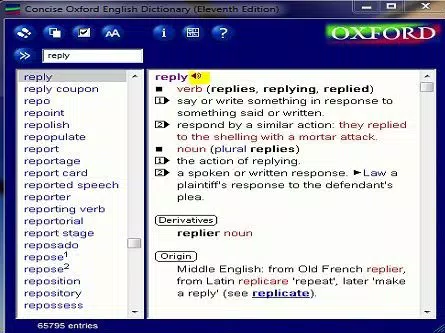
The app delivers a suite of practical features designed for speed, accuracy, and customization.- Instant Word Lookup: By double-clicking any word, users instantly access its definition, eliminating the need to copy, paste, or switch applications. This feature is ideal for maintaining focus during reading or research.
- Compact, Integrated Interface: The search bar is embedded into the title bar of nearly any Windows program, allowing users to access the dictionary without opening a separate window or disrupting their workflow.
- Priority-Ordered Definitions: Common meanings are displayed first, ensuring users receive the most relevant definition quickly. Expanded views allow access to nuanced meanings, etymology, and usage examples.
- Hyperlinked Articles: Definitions are interconnected, enabling users to navigate between related terms and explore linguistic relationships, supporting deeper understanding and contextual learning.
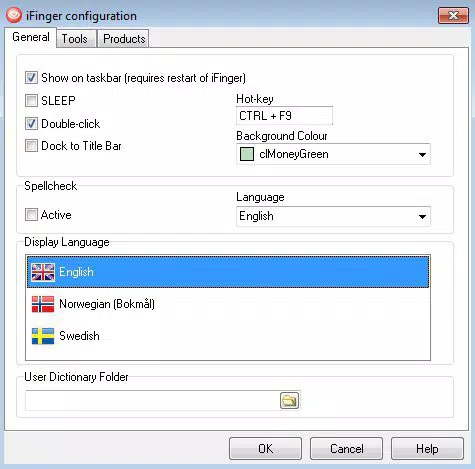
- Custom Dictionary Expansion: Users can import personal dictionaries from text files or add entries manually, making the tool adaptable to specialized fields such as medicine, law, or technology.
Интерфейс, UX и производительность
The interface of iFinger Collins English Dictionary is intentionally minimalistic, prioritizing functionality over visual flair. The compact design ensures it occupies minimal screen real estate, making it ideal for multitasking environments. Navigation is straightforward: users simply double-click a word to trigger a lookup, with results appearing directly in the title bar. The layout is consistent across applications, maintaining a predictable user experience. Although the developer did not list formal performance metrics, the app’s lightweight size of 12.3 MB suggests efficient resource usage. It operates smoothly on standard Windows systems, with no reported lag during lookup or navigation. Responsiveness is strong, with definitions appearing almost instantaneously after a double-click. Stability appears high, as the integration with various Windows applications implies robust compatibility. The app does not interfere with the host program’s operation, maintaining system performance. However, specific requirements for device categories or performance benchmarks were not disclosed. Users may benefit from the app’s low memory footprint, especially on older or less powerful machines. Overall, the user experience is optimized for speed and ease of access, aligning with the needs of users who value efficiency in daily tasks.Совместимость платформ и технические требования
iFinger Collins English Dictionary is designed exclusively for the Windows operating system. The app is compatible with Windows platforms, though the developer did not specify minimum OS requirements. The software version is 1.0, with a file size of 12.3 MB, indicating a lightweight installation. No additional dependencies or hardware requirements were listed. The app does not appear to be available on other platforms such as Android or iOS. Users should verify compatibility with their current Windows environment before installation. Although the developer did not provide detailed technical specifications, the app’s small footprint suggests broad compatibility across modern and legacy Windows systems. For users seeking a cross-platform solution, this limitation should be considered. The lack of information on system requirements means that installation on older or less common configurations may require trial and error. Nonetheless, the app’s design implies a focus on accessibility and broad usability within the Windows ecosystem.Плюсы и минусы
- Лёгкое, всего 12.3 МБ, обеспечивает быструю установку и минимальное влияние на систему
- Мгновенный поиск слов двойным щелчком, сохраняет непрерывность рабочего процесса
- Бесшовная интеграция в строку заголовка большинства Windows‑приложений
- Поддерживает импорт пользовательских словарей, позволяя персонализировать и специализировать
- Гиперссылки в статьях способствуют более глубокому пониманию через контекстную навигацию
- В настоящее время ограничено только Windows; нет поддержки Android, iOS или других платформ
- Конкретные системные требования не раскрыты, что может вызвать неопределённость
- Интерфейс минималистичен, что может не понравиться пользователям, предпочитающим более богатый дизайн
- Поддерживается только один язык (английский), что ограничивает многоязычных пользователей
- Настройка требует ручных усилий или подготовки текстовых файлов, что может отпугнуть менее технически подкованных пользователей


